Obsidian plugin · desktop and mobile
The AI agent for Obsidian, built for your phone first.
Chat with a model, ask your vault and get answers that cite your notes, or hand edits to an agent that asks before every change.
- FreeOpen source, GPL-3.0
- Your own keySix providers, or a local model
- No AXXA accountAnd no telemetry

01Specification
What you’re installing
| modes | 3 | Chat, Vault Q&A and Agent, in one side panel. |
|---|---|---|
| price | Free | No tier and no license key. You pay your AI provider directly; the plugin takes no cut. |
| license | GPL-3.0 | Source on GitHub. |
| requires | Obsidian 1.11.4+ | Windows, macOS, Linux, Android and iOS. |
| size | < 500 KB | 463 KB of JavaScript in version 0.9.21. |
| providers | 6 | OpenAI, Anthropic, Google Gemini, OpenRouter, NVIDIA NIM, Ollama. |
| api_keys | Your own | One per provider you use. Ollama needs none. |
| storage | Markdown | Chats, skills and cost reports are notes in your vault. |
| telemetry | None | Nothing is sent to AXXA Lab. |
| review | Passed | Obsidian’s automated plugin review. |
02Modes
Three modes in one panel
Chat
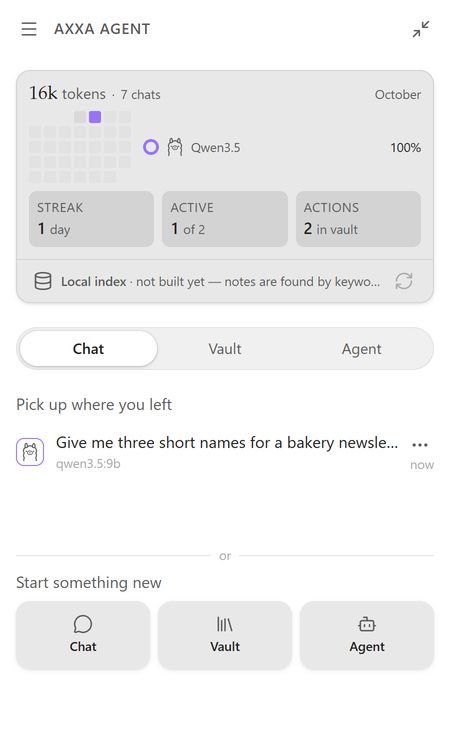
Talk to the model you pick, from any of the six providers. Recent chats wait on the home screen.
Vault Q&A
Ask about your notes. The search runs three ways at once, and the answer cites the notes it used as links you can open.
- keyword
- Names, dates, rare terms.
- vector
- Meaning, so synonyms match.
- links
- A note linked from another match moves up.

Agent
Creates, edits, moves and deletes notes through a small set of tools. Every change waits for your OK. Moves and deletes go through Obsidian itself, so your link and trash settings apply.

On the phone
Keyboard-aware
The composer stays above the on-screen keyboard.
Fullscreen if you want it
An optional mode gives the panel the whole screen.
Nothing left out
All three modes, confirmations included, run in Obsidian’s mobile app.
03Providers
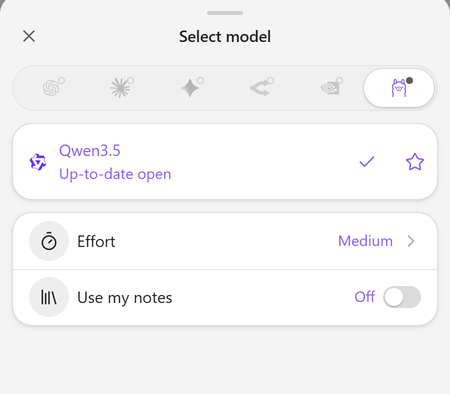
Six providers, your own key
Bring a key from any of them, or point the plugin at your own Ollama server. Keys are kept in your OS keychain, not in the plugin’s settings file.
- OpenAI
- Anthropic
- Google Gemini
- OpenRouter
- NVIDIA NIM
- Ollama local
04Size
Under 500 KB of JavaScript
Smaller than each of the 12 most-downloaded AI plugins in the Obsidian directory. Their median is about 3.8 MB.
05Files
Everything is saved as Markdown
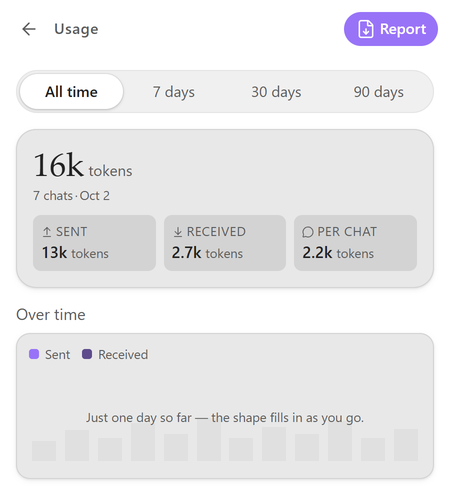
Chats, skills and cost reports are notes in your vault, so they sync, search and back up like the rest of it.
- Chats .md
- Skills .md
- Cost reports .md
06Setup
Get started in a minute
Requires Obsidian 1.11.4 or newer, on desktop or mobile.
-
Add it
Open the AXXA Agent page and choose Add to Obsidian, or search for AXXA Agent in Settings › Community plugins › Browse.
-
Enable it
Install and enable it, then open Settings › AXXA Agent › Providers.
-
Connect a provider
Add a key for one provider, or the address of your Ollama server (usually
http://localhost:11434), and start a chat.
Free ways to start
You only need one provider.
- Google Gemini
- Has a free tier.
- OpenRouter
- Has free models, marked in the model picker.
- NVIDIA NIM
- Gives free credits.
- Ollama
- Runs models on your own computer, with no key and no account.
07Privacy
Your notes stay yours
What leaves your device goes to one place: the AI provider you picked.
Keys on your device
Stored in your OS keychain through Obsidian’s secret storage, never in the plugin’s settings file, so they don’t travel through Sync or backups.
Only the provider you chose
Your notes leave the device only as part of a conversation or the Vault Q&A index. The index itself stays in your vault.
Offline with Ollama
Chat and the agent run fully on your machine with a local model. Vault Q&A then searches by keyword, because the embedding models are cloud services.
Every network request the plugin makes is listed in the Disclosures. This site’s own practices are in the privacy policy.
08FAQ
Common questions
Is it free?
Yes. Every feature in the plugin today is free, with no tier, no account and no license key, and it stays that way. If paid options appear later, they will be new things built on top, never a lock on something that already worked. You pay your AI provider directly; the plugin takes no cut.
Does the agent work on mobile?
Yes. Chat, Vault Q&A and the agent with its confirmations all run in the Obsidian mobile app. Cloud providers work anywhere; Ollama runs on a computer, so using it from a phone needs an Ollama server the phone can reach.
What leaves my device?
Only what goes to the provider you chose: your messages, what you attach, and the note excerpts that Vault Q&A and the agent use. Nothing goes to AXXA Lab.
Can I keep other AI plugins installed?
Yes. AXXA Agent runs in its own panel, its styles are scoped to that panel, and it doesn’t depend on or replace other plugins.
Where do I report a bug or ask a question?
Bugs go to the bug report form, questions and ideas to Discussions.
09Install